Brands, Email Domains & Footers
Last updated: April 21, 2026
Setting up Rally for multi-brand organizations without creating unnecessary templates.
This guide explains how workspace settings, brands, email domains, footers, and custom HTML email templates work together in Rally, and how to configure them to:
maintain consistent branding and compliance
reduce the number of email templates you need to manage
ensure researchers use the custom email domain and never send from individually connected email accounts
decide when pixel-level brand control justifies a custom HTML shell over the default branded shell
Custom Email Domains & Sender Settings
Custom Email Domains
Rally supports two methods for sending emails:
Individual Email Accounts: When you connect your Google or Microsoft 365 account, emails are sent directly through your own email server. The email actually comes from your personal inbox.
Custom Email Domains: When you set up a custom email domain (like research@yourcompany.com), Rally uses their own email infrastructure with Mailgun to send emails on behalf of your domain. This requires DNS configuration to authenticate your domain.
The choice between these methods should be informed by your company’s email send policies and affects sending limits through Rally. Rally recommends using a custom email domain over individual email accounts for most study communications from Rally. Use individual email accounts sparingly and for specific scenarios, if at all.
Using a custom domain:
Removes the ~700 emails/day limit of personal Gmail accounts
Improves deliverability and reduces spam risk
Enables bounce tracking and email analytics
Ensures emails come from your organization—not an individual researcher
Uses Rally’s email infrastructure instead of your organization’s
Recommended Setup
Use a subdomain, not your primary corporate domain.
Example: research.company.com
Why subdomains are safer
Mailgun automatically creates email.company.com for link tracking
Many companies already use this subdomain elsewhere, which can cause conflicts
Subdomains isolate research sending reputation from core business email
IT involvement is usually required for each domain to address these settings:
DKIM (TXT records)
Return-Path (CNAME records)
Mailgun MX records (recommended if the subdomain has no existing MX records)
👉 Rally Help Center: Email Domains
Team Senders vs Personal Senders
Rally supports two types of sender addresses. Both should use your custom domain, instead of individual email accounts.
Team Sender Addresses
Best for...
Automated emails (confirmations, reminders, reschedules)
High-volume or shared inbox workflows
Key characteristics
Configured at the workspace level
Shared by all researchers
Tied to your verified domain
Recommended setup
From name: “Company Research” or “User Research Team”
Reply-to: shared inbox (e.g., research@company.com)
Personal Sender Addresses
Best for...
Interview outreach where a human connection matters
Key characteristics
Configured per researcher
Selected from a dropdown when composing emails
Recommended setup
From name: Full name + role
Example: Jane Doe, UX Researcher
From address: still uses the custom domain
Example: research@company.com
Reply-to: personal inbox or shared research inbox
Important: Personal sender ≠ personal Gmail or Microsoft account. It’s a display identity, not an individual email account connection.
Prevent Sending from Individual Email Accounts (Critical Guardrail)
Ensure researchers never send from their individual Google or Outlook email accounts and are always using the custom email domain with the following:
Admin-level control
Disable “Allow email sending permission when connecting Google or Microsoft accounts” from your Workspace-level Account settings
This prevents Rally from sending email through individual user’s connected email accounts. This is the strongest technical control available today.
Rally CANNOT enforce
A single workspace-wide default sender for all users
Removing personal sender options entirely
Best practice
Disable personal email sending permissions
Require all users to:
Set a custom-domain sender as their default
Use team senders for automated emails
Reinforce through onboarding and audits
👉 Rally Help Center: Email sending & settings
Brands
Brands only control visual identity and compliance information, not email-sending mechanisms.
Brands control:
Logo - max 150 pixels wide
Primary color - used for buttons, links, and accents in landing pages and emails
Company name - shown to participants
Physical mailing address - necessary for CAN-SPAM compliance
Custom HTML email template - that can allow you more control over layout and placement of headers, footers, and logos
Brands do not control:
Email footers directly - for those that are defined in the custom email domain settings
Which domain sends the email
Which sender address is on the envelope
Which email template content (copy) is displayed which researchers pick in a study
Brands can be set for a study or sign up form in the following ways:
Assigned as the default for the workspace or for a specific team and will be pre-selected whenever a study is created from scratch
Selected per-study during the Plan step
Referenced from study templates so new studies start with the right brand pre-selected
👉 Rally Help Center: Branding
Email Footers
Email footers are associated with a specific custom email domain and are NOT template-level or brand-level settings.
Each custom email domain can have ONE email footer or NO email footer.
That footer applies automatically to all emails sent from that custom domain, branded or plain text.
Footer contents typically include:
Physical address (often pulled from the selected brand)
Legal or regulatory disclaimers
Required unsubscribe language
The footer editor offers a simple mode WYSIWYG.
Researchers cannot edit footers per study or template. These are set in global settings and associated with the corresponding custom email domain.
👉 Rally Help Center: Email Footers
Email Templates & Layouts
Email Template Layouts
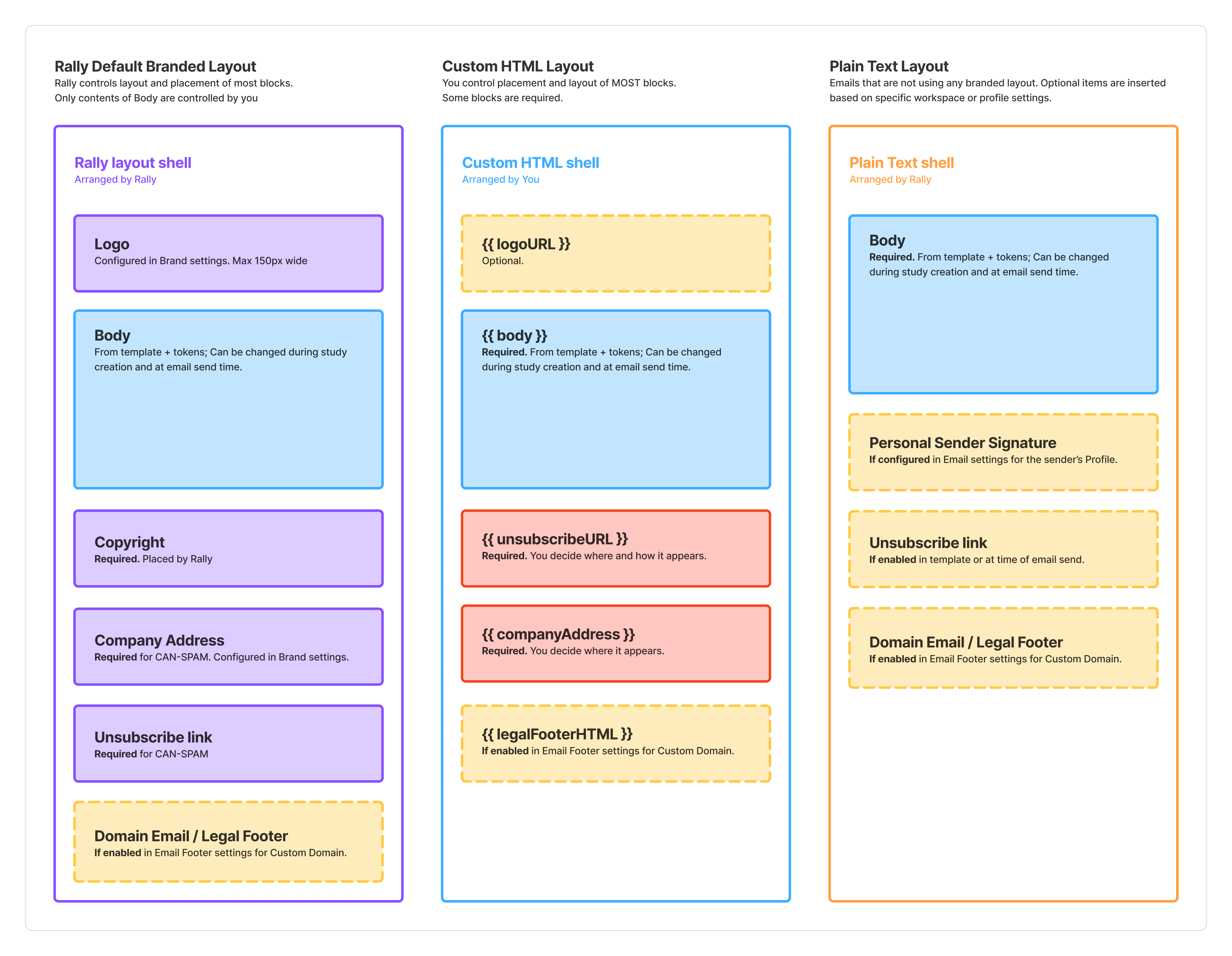
Every email sent through Rally is rendered through one of three layout shells:
Plain Text Layout
This layout doesn’t involve any branding, HTML, or styling. Using the plain text layout is effective for more personal email sending and with less complex content needs. Unsubscribe links are optional for this type of layout. Personal sender signatures will be displayed if enabled.
Default Branded Layout
Rally defines a standard layout that applies your brand’s logo, primary color, and company name; injects body copy from the selected email template; appends the required Rally unsubscribe block for CAN-SPAM rules; and appends the custom domain’s special email footer if one is set up. This layout is responsive and tested across major clients, browsers, and is maintained by Rally.
Custom HTML Layout
An HTML override layout you can define at the brand level. This allows you to more closely match the layout and styling your company uses for other branded email communications. When configured on a Brand, it replaces Rally's default shell entirely for every email sent under that Brand. The body content, personalization tokens, required unsubscribe link, and the domain-level footer all still apply, but the surrounding HTML is yours.
Custom HTML layout affects:
The visual container and chrome wrapping every branded email under that Brand
Any brand-identifying metadata you embed in the HTML (e.g., a hidden identifier for downstream tools like Front to auto-route replies by brand or market)
The ability to use brand typography, imagery, and layout conventions that Rally's default shell doesn't expose
Custom HTML layout does NOT affect:
Personalization tokens — continue to resolve normally; tokens are substituted after the HTML is assembled
The special custom domain email footer — still rendered from the domain's footer setting, below your HTML. If your custom HTML already includes legal/unsubscribe content, you'll see a "double footer" unless you design around it
Email signatures — the per-sender plain-text signature still applies only to non-branded, non-automated emails, IntercomIntercom independent of the HTML template
Email domain — unchanged; determined by workspace/domain settings, not by the Brand
The required unsubscribe link — branded emails still require an unsubscribe mechanism. Rally will append it if not present in your HTML
Which sender the email is coming from — unchanged; This can be set by default in custom email domain settings
Important considerations for Custom HTML Layout
One custom HTML template per Brand. No per-study, per-email-type, or per-team overrides.
Editing the HTML takes effect immediately for all future sends under that Brand — there is no staging environment, so test thoroughly.
Rally does not prevent invalid or mis-rendering HTML; customers are responsible for cross-client testing (inline CSS, dark mode, Gmail clipping at ~102 KB, Outlook quirks).
Automated emails (interview confirmations, reminders, cancellations) render through the same shell, so mistakes in HTML affect both manual and automated outreach.
The domain-level footer cannot be disabled when using a custom HTML template, which causes the double-footer scenario if legal content is duplicated. Design your HTML to coexist with the special custom domain email footer or remove this footer from your custom email domain settings.
👉 Rally Help Center: Custom HTML Email Templates
Email Templates
Using email templates simply pre-sets the layout, content, and some message settings. This is a key efficiency and consistency feature to take advantage of best practices and follow brand guidance. Many of these can be modified within the study builder or at the time of sending within a study.
Study-level Controls
How studies use branding, email domain, and email sender:
Branding
Branding is set during the Plan step of the study builder
Branding can be preset for a study through the following methods:
Establishing a default brand for a team or the workspace
Using a template to create the study that has a specific brand selected
Branding only determines logo, colors, corporate address for CAN-SPAM email compliance
Email domain
This cannot be set at a template or study level.
Uses the custom email domain and footer settings from the workspace global settings
Determines email footer and technical sending details
Email sender
This cannot be set in the study builder.
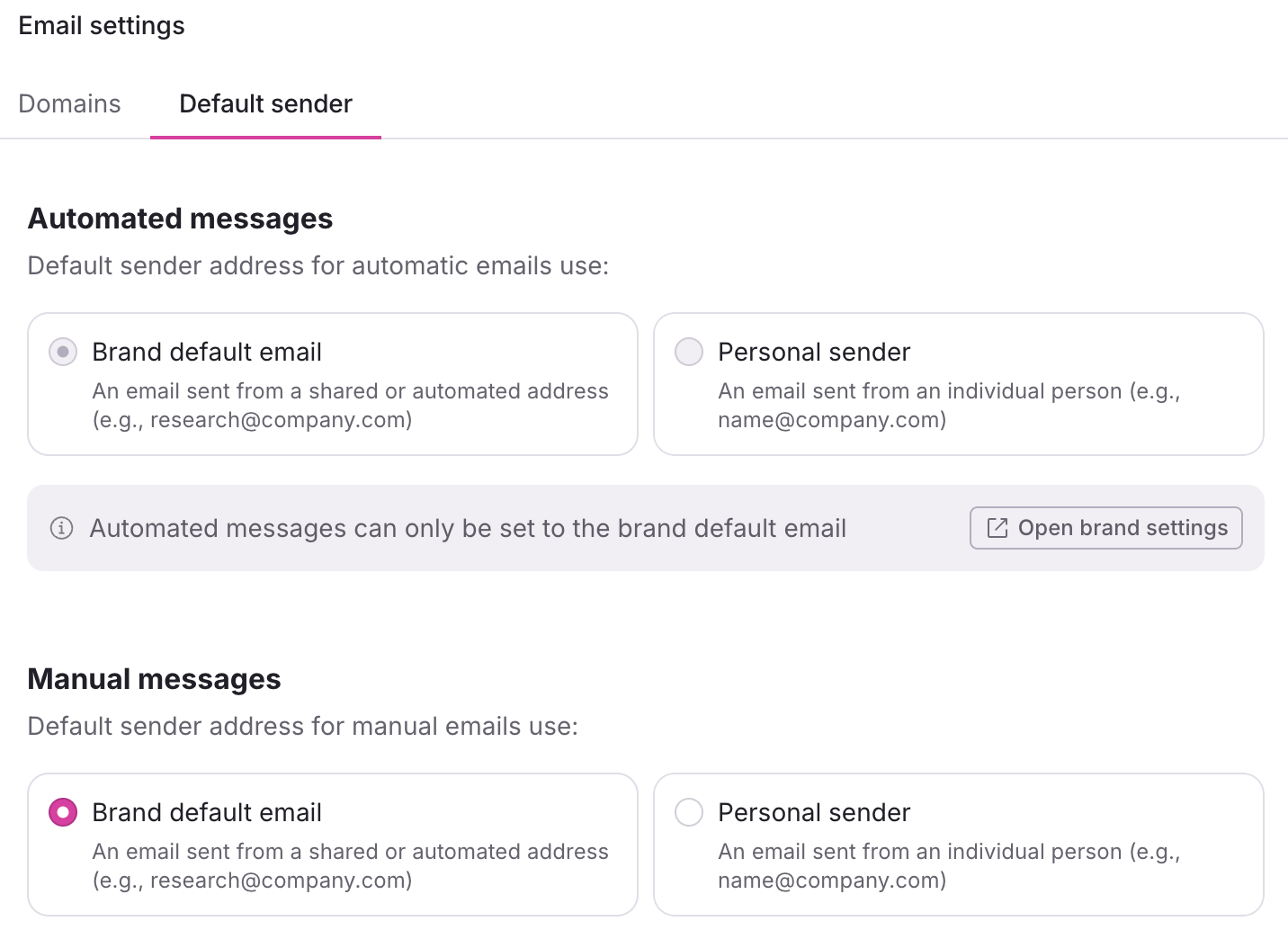
Which email sender is used by default is determined by the workspace global email domain and sender settings.
Manual messages will use the default email sender for the email domain, but can be changed by the researcher at the time they send messages to participants. Manual messages include:
Interview/Unmoderated screeners
Interview schedule
Interview request reschedule
Survey/Test invitations
Incentives
Custom messages
Automatic messages will always use the default email sender set on the email domain and cannot be overridden. Automatic messages include:
Interview confirmation
Interview reminder
Interview cancelation
Recommended Setup
“Low-Complexity” Setup Pattern
For most multi-brand organizations:
1 shared research email domain (a subdomain like research.company.com)
1-2 team sender addresses + personal sender address on your company’s domain
1 centralized research brand (with compliant address) - or one brand per market, sharing a single domain and footer
A small, reusable email template library for invitation, screener, reminder, and incentive copy
Rally’s default branded layout - no custom HTML
Study-level brand selection for visual variation
This approach:
Minimizes admin overhead
Prevents researchers from mis-sending
Keeps you inside the well-tested render path
Scales as teams grow
When to Graduate to Custom HTML Layout
A custom HTML email template is the right call when at least one of the following is true, and your organization has the design/dev capacity to maintain it:
Brand parity is non-negotiable — the research function is required by brand, marketing, or legal to match the exact visual system of corporate email, beyond what logo + primary color achieves.
Multiple brands share one domain and you need downstream routing — e.g., international markets send from one research subdomain but you need to include additional metadata in the email that can’t be edited by a researcher and will be used to auto-route replies to different mailboxes. A hidden identifier in each brand's custom HTML is the canonical solution.
You need more layout or typography control — custom masthead imagery, multi-column layouts, or brand-specific font stacks.
You have HTML ownership — someone (in-house email developer, marketing dev, or agency) owns the HTML, can test across clients, and responds to breakage.
Reasons not to reach for custom HTML:
One-off study styling (use body-level formatting in an Email Template instead)
Swapping copy or tokens (that's an Email Template)
Changing sender or domain (that's workspace settings)
Hiding the Rally footer (you can't)
Design rules to avoid the most common pitfalls:
Assume the domain-level footer will still render below your HTML. Do not duplicate the physical address or unsubscribe link in your HTML body unless you've confirmed the footer is structured to avoid redundancy.
Preserve personalization tokens as Rally expects them. Tokens are resolved after HTML assembly, so they work inside your markup the same way they work in default templates.
Keep the required unsubscribe token in the HTML if you don't want Rally to append one.
Inline all CSS. Avoid <script>. Keep total rendered size under ~100 KB to prevent Gmail clipping.
Test in Litmus or Email on Acid before deploying — the HTML applies to every email sent under the brand, including automated interview confirmations and reminders.
Resources
https://help.rallyuxr.com/articles/6519531670-email-domains
https://help.rallyuxr.com/articles/1892854849-branding