Budgets & Incentives
Last updated: February 20, 2026
About Budgets
Budgets in Rally hold funds to support Tremendous incentives and external panel recruiting fees. They are flexible and can be used both for tracking and protecting access. You can create more than one budget and easily move money between budgets based on your organization's needs.
When to Use Different Budgets
Common Scenarios for Different Budgets
Here are the main scenarios where organizations want to create multiple budgets in Rally:
Team-Based Budget Separation: Organizations often want separate budgets for different teams or departments to maintain spending control and accountability. For example, having dedicated budgets for Market Research vs UX Research teams, or organizing by product areas like Buyer, Post-Order, Partner, ML, and Payments teams.
Spend Type Segregation: Companies want to separate funds by type of expense - for instance, having one budget for participant incentives and another for external panel recruitment fees. This allows them to ringfence funds and track different types of research spending separately.
Access Control and Permissions: Organizations use multiple budgets to prevent teams from accidentally accessing funds they shouldn't use. This is particularly important when multiple researchers are sharing resources and need to select appropriate budgets for their specific studies.
Project or Study Type Allocation: Some organizations want to allocate specific amounts to different types of research projects or ongoing studies, ensuring funds are reserved and tracked appropriately for each initiative.
Geographic or Brand Separation: Organizations operating across multiple regions or brands may want separate budgets to track spending and maintain financial controls for each area.
Identify the Primary Budgeting Goal
Before creating budgets, examine how you currently report on research spending. The following goal scenarios have different budget tracking approaches that can inform your budget creation strategy:
For Accountability: Consider Team or Department-Based Budgets (e.g., "UX Research," "Product Marketing"). This is best for organizations where each team owns its own P&L and will be represented as a “team” in Rally.
For Operational Clarity: Consider Spend Type Budgets. Create one budget for “In-House Recruiting” and another for "External Panel Recruiting & Fees" This helps segment standard recruiting from recruiting with additional fees.
For Strategic Tracking: Consider Project or Study Type Budgets. If your organization has a major initiative (e.g., "Mobile App Relaunch"), create a dedicated budget to ensure those funds aren't used for general research.
For Global/Large Orgs: Suggest Geographic or Brand Separation (e.g., "North America Research" vs. "EMEA Research") to handle different currencies or regional tax requirements.
Leverage Access Controls
Budgets in Rally aren't just for tracking—they are a security tool.
Guidance: Create separate budgets if you have "sensitive" funds that only specific researchers should access.
The Benefit: By assigning specific teams to specific budgets, they prevent "budget bleeding" where one team accidentally spends the budget of another.
Best Practices
Start Simple: Don't over-segment initially. Start with 2-3 broad budgets and get more granular as the team and usage grows.
Review Quarterly: Check your "Spend vs. Budget" reports every quarter to adjust funding levels for the next period, archive budgets that are no longer needed, etc.
Funding Budgets
Rally supports two primary ways to fund incentive budgets:
Invoice/ACH Transfer (Recommended)
Request an invoice for a specific amount you want to add to Rally
No processing fees - 100% of funds go toward incentives
Allows you to create a Purchase Order (PO) at your organization and Rally sends an invoice
Payment is processed through traditional invoice/ACH methods
Funds are added to the Rally workspace after payment is received, typically within 24 hours
Typically used to fund incentives for the full year or each quarter
Credit Card
Immediate funding available once a credit card is added to the account
3% processing fee applies to all credit card transactions
Funds can be added in any amount (no minimum)
Good for ad hoc or smaller amounts when speed is needed
Additional details:
There is no minimum funding amount for either method
Invoices can be requested directly through the Rally platform using the "Request Invoice" feature
Funds are loaded into a workspace budget and can be transferred to team-specific budgets as needed
Wire transfers are also mentioned as an option, which appears to be the same as the ACH/invoice method
About Incentives
Tremendous Incentives
Tremendous is Rally’s native partner, providing over 1,000 redemption options (gift cards, prepaid cards, bank transfers, and charities) across 200+ countries.
Incentives issued through the integrated Tremendous option automatically update annual incentives totals per participant so you can honor your tax obligations and set governance rules to avoid overpayment.
Tremendous Reward Options
The following options are turned on for all Rally workspaces by default:
All Global Retailer Gift Card Options (2000 options+ globally)
All Charity Options (50+ options globally)
All Prepaid Card Options (2 options)
NO Monetary Options (these incur a fee)
Reminder: The reward options presented to a participant are only the ones relevant to their geographic location.
Tailoring Tremendous Reward Options
Rally can tailor the list of reward options available to your participants
Turn OFF any Gift Card, Charity, or Prepaid Card Option if your organization finds those options to be problematic.
Turn ON any Monetary Option with acknowledgement that this introduces a 6% fee that is passed to participants and deducted from their total reward amount.
Per Tremendous policy, there must be at least 1 no-fee option available to participants in addition to any monetary options.
Custom Incentives
Custom incentives are used when you want to reward participants using methods outside of the Tremendous ecosystem. This allows you to track all rewards in Rally for governance and limit-tracking while fulfilling the payment through your own channels.
When to Use Custom Incentives
Internal Perks: Employee "massage points," extra PTO,
Physical Rewards: Company swag or gifted products
Product-Specific: In-app credits, discount codes, or loyalty points.
Manual Payments: Bank deposits in regions not supported by Tremendous or via internal finance systems.
Pre-Purchased Rewards: Gift cards you already bought elsewhere.
The monetary value of any custom incentive is NOT included in the annual incentive calculation in Rally. Additional tracking may be needed to honor tax obligations and limit overpayment.
Templates for Custom Incentives
Add each custom incentive option into the Templates section.
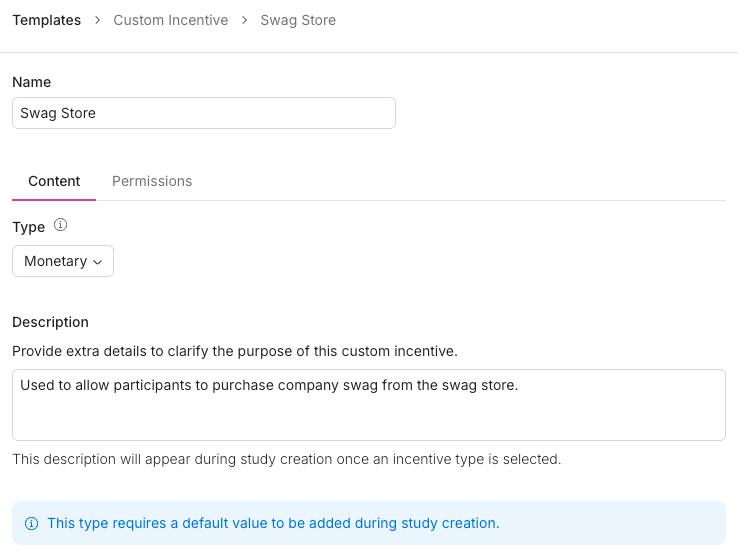
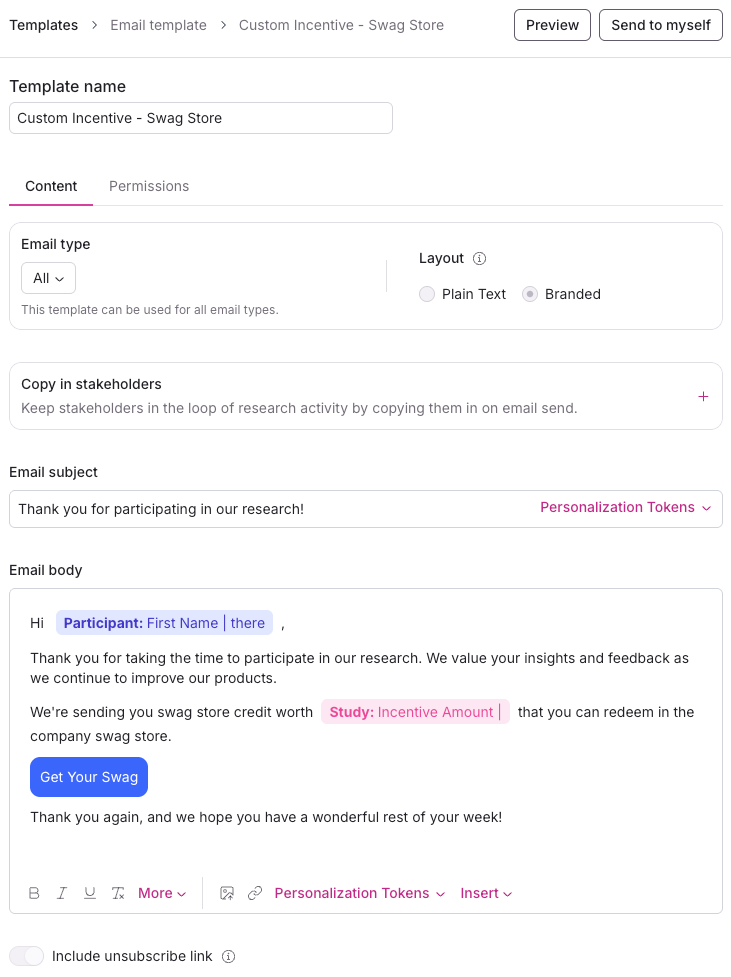
Create an email template for each custom incentive option you will be offering your participants. This will allow you to ensure consistency in how custom incentives are communicated to participants. This email template should be saved as “All” types and not the “Incentive” type.
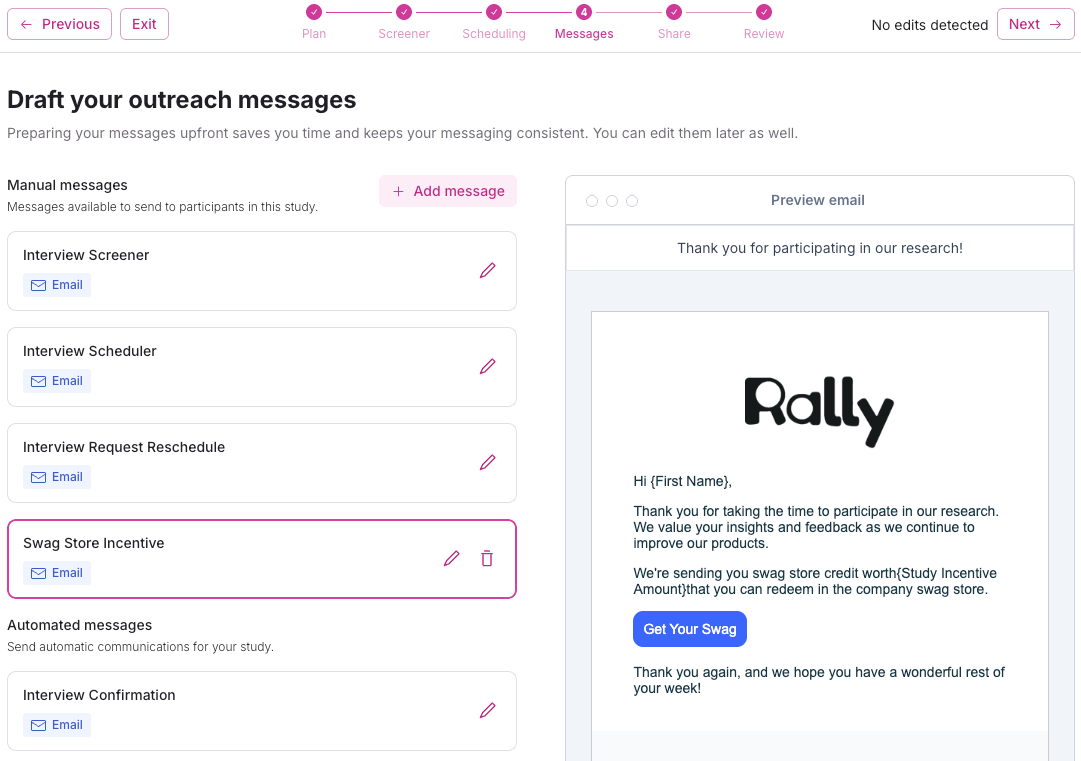
Pull the custom incentive email template into your study or study templates as a “Custom Manual Message”
Annual Tax Reporting
Tremendous’s built-in tax features are U.S.-focused (W-9 collection, 1099-related exports/workflows). Tremendous does not handle international recipient tax forms or reporting.
Best Practices for Tracking Incentives in Rally
Use segments to monitor current year incentive total per participant and include country data to follow local regulations.
Export incentive payout data as-needed for Finance/AP to reconcile and apply local rules.
Use custom governance and engagement rules in Rally to minimize the potential for a participant to be included in research activities if they are near the annual limit.
Request Tax Reporting Support for Tremendous
Rally workspaces are not set up for tax reporting support in Tremendous by default. If you anticipate your organization will need to collect information through Tremendous to satisfy annual tax reporting obligations, notify your CSM to begin the setup process.
When it’s important to enable tax reporting in Tremendous for your Rally workspace
You have external participants (customers, prospects, non-employees, non-contractors) participating in paid research who may exceed incentive reporting thresholds across the tax year
You can minimize or eliminate this scenario by using custom governance and engagement rules in Rally to prevent participants from being included in research if they are near the threshold
You are issuing incentives to participants that have a clear monetary value
Your organization requires tax reporting to support their audit posture
Request Export of Tax Data
You must have tax reporting support set up in advance to be able to properly collect W-9s and export this data later.
Direct access to data to support tax reporting is not available. Ask your CSM for an export of tax data.