Roles & Permissions
Last updated: February 20, 2026
Strategically configure Rally access to balance research speed with organizational governance.
Defining Your Rally Users
The ability to perform actions in a study requires the right roles and permissions as well as being added as a study owner to the studies.
Before setting permissions, identify who is actually “touching” the research process at your organization. Direct access is typically needed for three distinct groups of people:
Builders: People who are directly running research
These individuals are in Rally daily or weekly to execute research.
UX Researchers: Need full end-to-end access to manage the database and complex strategic studies.
Product Designers & PMs: Often need "Self-Serve" access to run usability tests or discovery calls using pre-approved templates.
Market Researchers: May need access to recruit larger quantitative cohorts or sync with external panels.
Enablers: Admins, operations, and governance
These individuals may not run studies, but they manage the environment where research happens.
Research Ops Managers: Need "Admin" or "Ops" access to manage global templates, incentive budgets, and tool integrations.
Legal & Privacy Officers: May need occasional access to audit Consent Forms, NDAs, and ensure PII (Personally Identifiable Information) is being handled according to company policy.
Data Privacy Leads: Specifically need to control how and when data is exported from the system.
Consumers: Stakeholders and collaborators
These individuals need to see the results of the research to make business decisions.
Engineers & Developers: Need access to the Observer Room to watch session recordings and understand technical friction points.
Product Leadership: Need to view study progress and high-level insights without the ability to edit the research design.
Customer Success/Sales: May need to "Nominate" specific customers for research or help vet if a participant is the right fit for a study.
Built-In vs. Custom Roles
How to choose the right foundation based on your organization’s risk tolerance:
Role Type | Best For... | Why use it? |
Built-in | Professional Research teams & simple Stakeholder viewing. | Speed: No setup required. Best for trained researchers who understand PII/PHI risks and are cautious when it comes to workspace changes. |
Custom | Self-serve or democratized research (PMs/Designers) & regulated industries. | Guardrails: Limits high-risk actions (e.g., database exports, PII modification) while allowing study execution. |
Custom Role Configuration
Core Principles for Custom Roles
Consider the following when exploring custom roles for your organization over built-in roles:
Balance Autonomy and Governance: The built-in Researcher role may offer too much access for your teams, while the "Collaborator" role is often too restrictive.
Protect Workspace Integrity: Limit permissions for creating studies from scratch, modifying PII/PHI properties, or exporting workspace-wide data to a core group of power users.
Support Self-Serve Enablement: Create custom roles that allow people to run their own studies using approved templates without risking broader database or governance settings.
Specific Permissions to Examine
When building custom roles, pay special attention to these "High-Stakes" toggles:
Population Management: Limit the ability to create and remove populations, as well as remove people from populations or the workspace to Admins/Ops.
PII/PHI Management: Only grant to Admins/Ops. This prevents accidental exposure or deletion of sensitive personal data.
The Observer Room: Ensure stakeholders have "View" access to sessions, but restrict "Download" permissions to maintain data sovereignty within Rally.
Database Exports: Strictly limit this to 1-2 people per organization to prevent mass data exfiltration.
Governance Overrides: Only senior researchers should be allowed to bypass "Cooldown" rules (to avoid over-contacting the same customers).
Recommended Custom Roles
Organizations should consider implementing the following tiered custom roles to support various levels of research involvement:
Self-Serve Researcher
Intent: For the majority of users (PMs, Designers) running their own research.
Key Capabilities: Can create studies from templates, send emails, and modify screeners/surveys.
Restrictions: Cannot create studies from scratch, recruit from external panels, or modify PII/PHI person properties.
Self-Serve Researcher Plus
Intent: For trusted users who need slightly more flexibility around governance and templates.
Key Capabilities: Includes all "Self-Serve Researcher" permissions plus the ability to recruit from external panels, create/modify templates (email, questions, study), and override governance cooldown rules.
Restrictions: Prevented from overriding more risky “do not contact” rules, budgets, and other workspace-level settings.
Researcher Onboarding
Intent: For new researchers who need to follow a playbook but require oversight before communicating with participants.
Key Capabilities: Can create studies from templates and view study data,
Restrictions: Prevented from sending emails, creating/modifying interviews, or adding people to the database until their sourcing is reviewed.
Detailed Permission Comparison
The following table highlights the critical differences between standard and custom roles to help customers choose the right fit for their teams:
Role > Permission | built-in
| custom | custom | custom |
Create studies from scratch | ✅ | ⛔ | ⛔ | ⛔ |
Create studies from templates | ✅ | ✅ | ✅ | ✅ |
Recruit from external panels | ✅ | ✅ | ⛔ | ⛔ |
Modify PII/PHI properties | ✅ | ⛔ | ⛔ | ⛔ |
Override cooldown rules | ✅ | ✅ | ⛔ | ⛔ |
Override do not contact rules | ✅ | ⛔ | ⛔ | ⛔ |
Send emails | ✅ | ✅ | ✅ | ⛔ |
Create/Modify interviews | ✅ | ✅ | ✅ | ⛔ |
Create/Modify templates | ✅ | ✅ | ⛔ | ⛔ |
Importance of Study Ownership
Study ownership works in combination with role permissions - you need both study ownership AND the appropriate role permissions to make changes to the study like adding or removing owners, changing study settings, sending emails or incentives, and updating the study status.
Users who NEED to be study owners to perform their role permissions
Most users need to be added as study owners to perform actions within a study, regardless of their role permissions. This includes:
Researchers: Cannot edit studies they don't own, even with researcher permissions
Ops Managers: Need study ownership for most study actions
Collaborators: Must be study owners to edit studies or perform most actions
Custom roles: Even with all permissions enabled, custom roles cannot bypass the study owner requirement
Only the Admin role can perform all their permissions without being added as a study owner. Admins have full controls and don't need to be added to anything in order to take action. They just have it by default.
Examples:
A user has a custom role with “Send email” ON. If the user is not also added as a study owner for the study, they will not be able to select any participants in the study to perform any action, let alone send emails.
Adding Users as Study Owners
Study owners can be added manually within each study by using the “Add Owners” action on the Overview page.
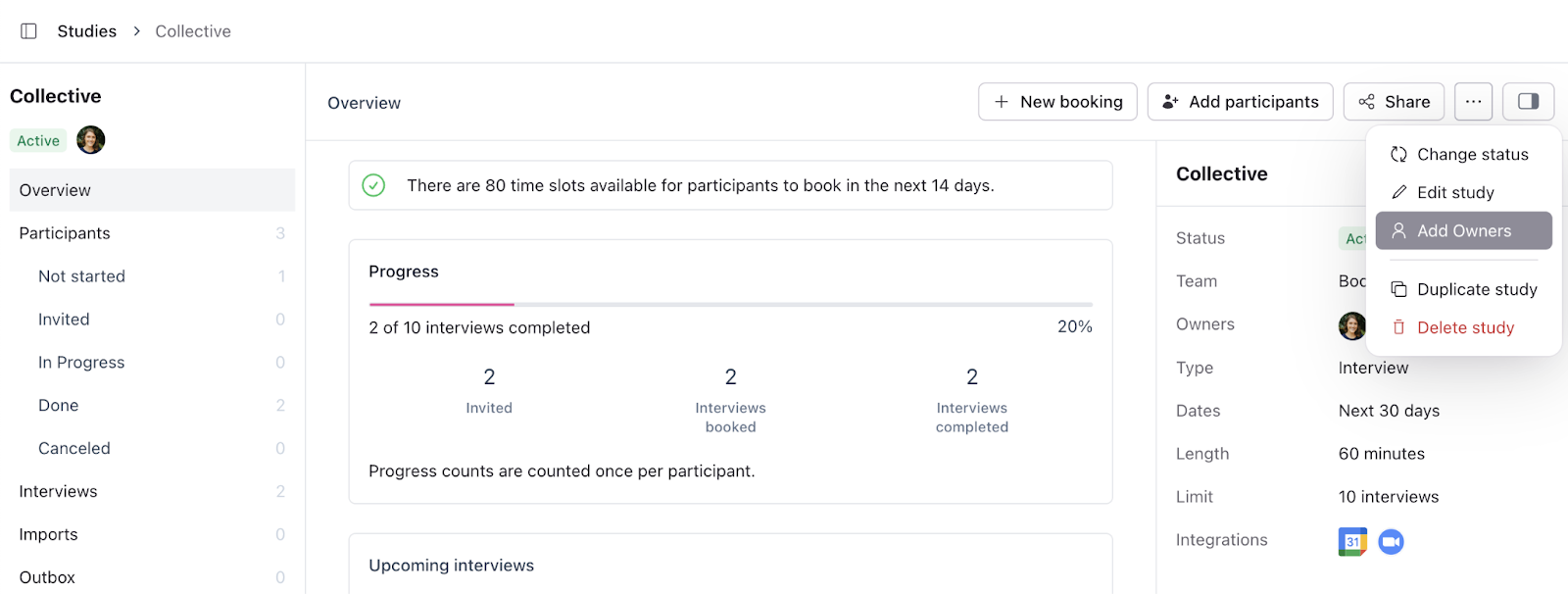
Study owners can also be set through the Rally API during study creation or study update requests.
References
https://help.rallyuxr.com/articles/5619809635-users-roles-and-permissions
https://help.rallyuxr.com/articles/2767125982-add-study-owners