Governance Rules
Last updated: April 27, 2026
Establishing effective governance rules in Rally to protect participants against over-contact, overuse, and overcompensation.
How Governance Rules Work
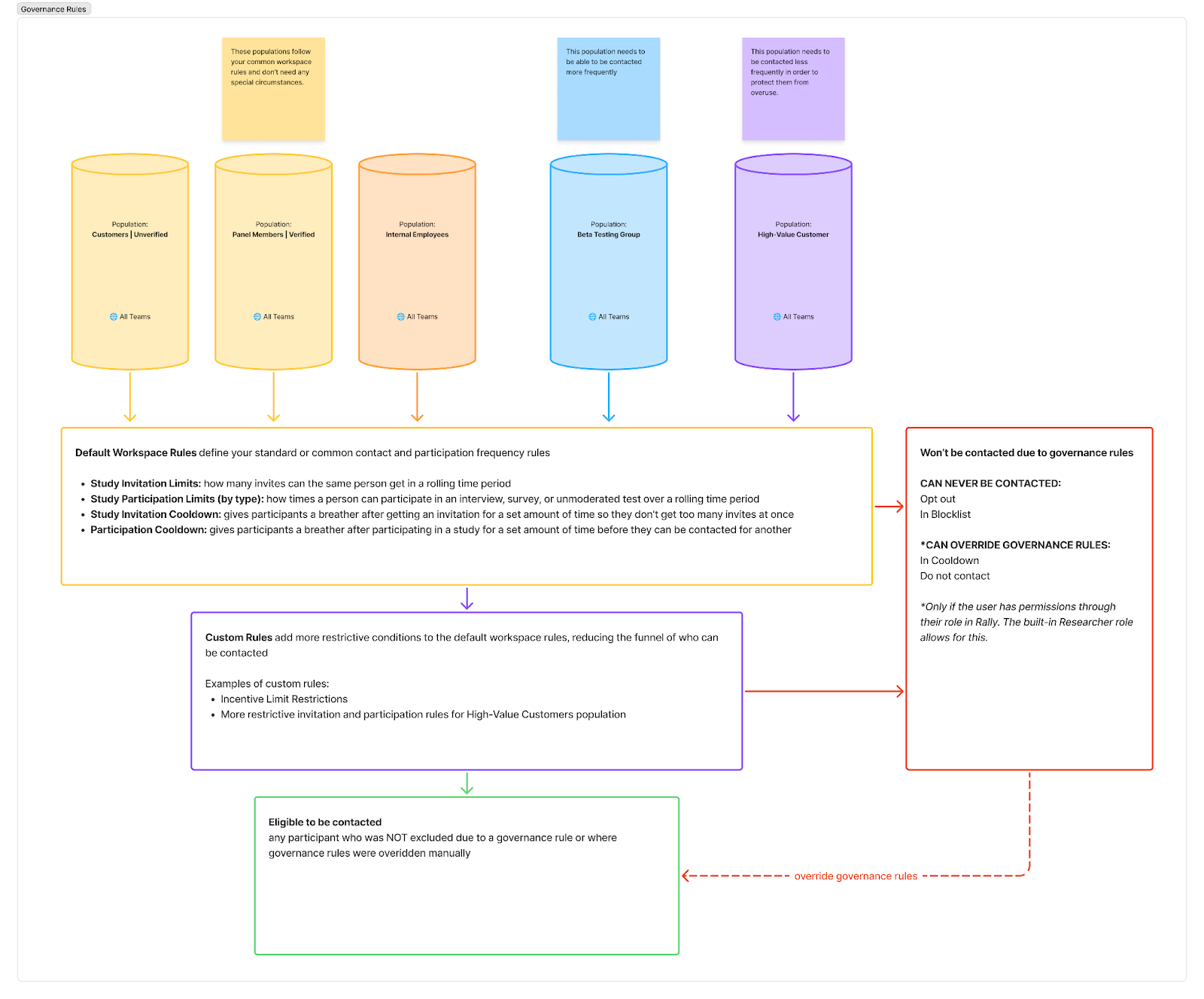
Contact Statuses
Contact statuses indicate who can be contacted and when
🟩 Free to Contact
Default status. Available to be invited or contacted about new studies.
🟨 In Cooldown
Can’t be invited to new studies until the cooldown expires. When the cooldown expires, the status will update automatically.
Can be overridden with a reason by users with the permission to do so.
Ex: Wait 7 days to invite again
🟧 Do Not Contact
Can’t be contacted due to certain rule restrictions. When the rule no longer applies, the status will update dynamically.
Can be overridden with a reason by users with the permission to do so.
Ex: Has reached the incentive limit for the year
🟥 In Blocklist
Added to the blocklist and can’t be contacted until they’re removed.
Cannot be overridden by anyone. An authorized Rally user (usually an admin) will need to manually remove the participant from the blocklist for them to be available to contact again.
Ex: Participant has a history of poor behavior during studies
🟥 Opted Out
Opted out and can’t be contacted unless they request to opt back in.
Cannot be overridden by anyone. An authorized Rally user (usually an admin) will need to manually update the participant’s opt out status based on the participant’s request in order for them to be available to contact again.
Contact statuses are updated when:
governance rules are checked
a participant opts out
a Rally user adds a participant to the block list
a Rally user sets a manual cooldown for a participant
Governance rules are checked and applied at the following moments:
Daily at midnight
After an email outreach is sent
When workspace governance settings are changed
When a new participant is added to the database
When a person is added to a study
When a participant property used in a custom rule is updated
Setting Governance Rules
Rally’s platform is designed to automate many of the participation guardrails you may need for your organization, allowing teams to move fast without manual tracking in spreadsheets.
Governance rules use database properties and conditional logic to determine if the rule should be applied.
When more than one rule is relevant for the participant, the strictest rule is the one that is applied.
Contact Frequency
Researchers often accidentally "spam" the same high-responding users. Set Cooldown Periods to protect the participant experience.
Global Cooldowns: Set a mandatory "Time Since Last Invite" (e.g., 30–60 days). This ensures that once a user is invited to any study, they are automatically hidden from future recruitments for that period.
Study-Type Specific Rules: Suggest different rules for different methods.
Surveys: 30-day cool-down (higher frequency is usually okay).
Interviews: 90-day cool-down (to prevent fatigue from high-effort tasks).
The "At Least 7 Days" Rule: For active recruitment phases, suggest a rule that prevents multiple invites within a single week to avoid overwhelming an inbox.
Participation Limits & Eligibility
The goal of research is fresh insight. If the same users participate every month, their feedback becomes more biased.
Participation Caps: Recommend a limit on actual sessions (e.g., "No more than 2 studies per quarter" or "3 per year").
Automatic Do Not Contact: Use custom rules to detect when someone should not be included in studies (e.g., has repeatedly not shown up for scheduled sessions, resides in a country that cannot participate, is otherwise classified as someone that should not participate).
Formal Blocklist: Use the Blocklist feature for participants that you have found to be disruptive or otherwise not appropriate to participate in research. This is manually managed and should be done with care.
Incentive Caps
Financial governance is both an ethical and a legal necessity (especially regarding tax thresholds like the $2,000 IRS limit in the US for 2026).
Annual Incentive Limits: Set a hard cap on total rewards (e.g., max $2000 per participant per year). Once a participant hits this, Rally can automatically flag them as ineligible for studies. Limits can align with:
tax obligations for the country/countries you recruit in
organizational limits
Budget Separation: Use different budgets for different needs.
Team-specific budgets: to prevent one department from accidentally "draining" the incentive pool and ensuring visibility into which teams are spending the most on specific participant groups.
Special scenario budgets: To reserve funds to support special recruiting or incentive needs like:
Survey raffle budget
Opt-in panel incentives budget
External recruiting budget
Transparent Tracking: Because Rally integrates with Tremendous, you can track the status of every reward (sent vs. claimed) to ensure they aren't double-paying or losing funds to unclaimed gift cards.
Limits with Incentive Caps: At this time, Rally can only calculate total incentives from the integrated Tremendous-based incentives. Custom incentives that carry a monetary value are not included in the “total incentives” calculation.
Custom Rules
Use custom rules to establish specific cooldowns and restrictions for your organization’s use cases.
Common use cases for custom rules include:
Add longer cooldown periods for participants in specific populations
Restrict certain industries or domains from being contacted
Prevent participants who are near or who have reached the annual incentive limit from being contacted
Protect access to sensitive customers that may be in a contract renewal, in a high-risk health score, or who have high-priority active support cases
Honor marketing opt-out preferences
Honor participant contact frequency preferences
Prevent participants with low participation ratings or show ratings from being invited to new studies
Population-Specific Governance Rules
Use custom rules to target specific populations to further restrict or establish only population-specific rules.
Custom rules only further restrict global engagement rules. They cannot loosen them.
If you have global engagement rules set for contact and participation limits, make sure these are the loosest rules in order to allow custom population rules for contact and participation limits to further restrict.
Otherwise, consider not using the global engagement rules at all and only using custom rules to set all contact and participation rules for different populations.