Template Controls
Last updated: March 24, 2026
Template Controls give template builders the ability to lock specific study settings, so anyone creating a study from that template can only edit the fields you've explicitly allowed.
Available template controls
Template controls are available for the following settings in a study template. Each control can be configured independently.
Participant limit | Control whether users can change the target number of participants or toggle unlimited participants on/off |
Consent form | Control whether users can change consent form settings, such as: including whether consent is required, which form is selected, and the display order |
Incentive | Control whether users can change incentive settings, such as: enabling consent, the type of incentive, amount/currency, and budget |
Questions | Control whether users can modify individual questions in a screener or a survey. Template controls for questions are on a per-question basis. This option is available for survey studies or studies with a screener only. |
Interview duration | Control whether users can change the interview duration. This option is available for interview studies only. |
Control options
The following options are available for all template controls:
Users can edit: Users can freely edit this field. This is the default value for all template controls.
Users can't edit: Users can't edit this field without explicit override permissions
Consent forms have one additional option that locks whether a consent form is required, while still allowing users to choose which form is used:
Users must select a consent form: Users can choose from available options but cannot remove or disable the setting entirely.
Using Template Controls
Creating and managing study templates, including Template Controls, requires the "Create and modify study templates" and "View study templates" permissions. By default, Admins, Ops Managers, and Researchers have these permissions.
Setting template controls
Template Controls are configured when creating a study template.
Settings that support template controls will display a pencil icon and the currently selected control, Editable by default, in the top right of the setting (see screenshot below):
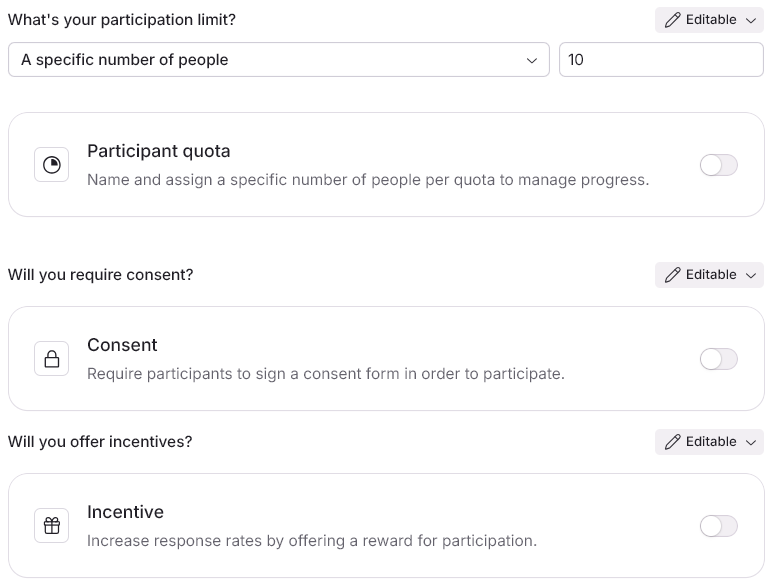
You can apply controls for participation limit, consent, and incentives under the Plan page.
If the study is a survey study or a screener has been added, template controls can be applied on individual questions by adding a question and then changing the template control visible in the top right corner of the edit question side-panel.
You can apply controls for interview duration under the Scheduling > Event Setup page.
Editing an existing template does not retroactively update studies that have already been created from the template. Users must create a new study from the updated template for the new rules to apply.
Overriding template controls
Users with the Override locked elements in study templates permission can edit any locked field in a study, regardless of the template controls applied.
By default, this permission is available only to Admins and Ops Managers.
When a user with override permission edits a locked field, a message will display next to the setting alerting the user that they are overriding the setting for this study and that the original template will not be affected.

This override is especially useful for senior researchers or ops staff who need to make one-off exceptions without modifying the underlying template.