Participant Ratings
Last updated: April 27, 2026
Participant ratings let your team evaluate individual participants after a research session on a star scale of 1 to 5 based on the quality of their feedback and participation in the study. Ratings make it easier to identify participants who are a strong fit for future research by helping you to:
Spotlight the most thoughtful, reliable contributors
Prioritize high-performers when multiple participants qualify
Build stronger cohorts over time
Share context across team members in Rally
What are participant ratings?
Participant Ratings are a quick way to capture how effectively a participant was able to take part in a research session.
When you rate a participant, you’re able to record signals related to:
Attendance and preparedness
Ability to follow study instructions
Technical readiness
Engagement and clarity during the session
Ratings can surface participants who contribute clear, impactful feedback. When used consistently, they enable your team to spot trends over time, prepare for future sessions with more context, and maintain continuity across roles and studies.
Participant Ratings may be considered personal data and can be subject to access, correction, or deletion requests under privacy regulations. Always write ratings as if the participant could review them.
How to rate a participant
Rating a participant is quick and should happen directly after a session:
Navigate to Interviews > Past for your study
Click Rate & Confirm Attendance
Select a rating and add in any useful context to the Notes section of your rating
Submit to save
Turn on Slack notifications to get post session reminders to rate participants
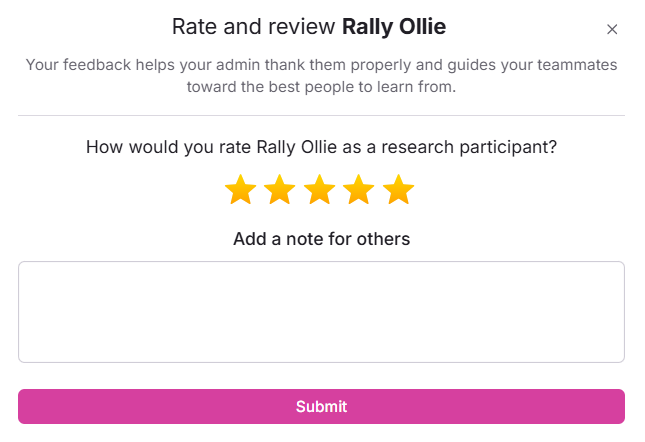
Once a rating is submitted:
The participant’s total rating appears on their Person Profile
Total rating is an average of all the ratings the participant receives across studies
Individual session ratings appear under the Notes tab
You can edit previous ratings by clicking Rate & Confirm Attendance again, making desired edits, and clicking Submit
Using ratings in your workspace:
You can create views and custom governance rules to help inform future study recruitment
Ex: set up a view for 4 or 5 star ratings to easily identify high quality participants
Ex: set up an engagement rule to automatically set participants with a 1 or 2 star rating as Do Not Contact.
What to consider when rating
When choosing a rating, the focus should be on whether the participant was able to meet the expectations of the study as designed, given the setup and guidance provided. For consistency, your team should agree on what different rating levels represent (i.e. 5 stars = want to interview again, provided clear feedback following all instructions, regular user of your product, etc.).
The intention for a rating system should be focused less on judging a participant and more on preparing a researcher to make more informed decisions about reducing operational risk, improving study fit, and supporting fair inclusion decisions.
You can consider the following factors when establishing a rating system:
Attendance reliability
Did the participant show up on time?
Did they give advance notice for lateness or cancellation?
Was the absence a no-show or a legitimate conflict?
Instruction follow-through
Did they follow study instructions?
Did they complete required tasks?
Did they use required setup (camera on, screen share, prototype access, etc.)?
Technical readiness
Was audio and video functional?
Was their connection stable enough for the session?
Could they troubleshoot basic issues or follow guidance?
Level of engagement
Did they respond thoughtfully rather than with one-word answers?
Did they stay reasonably focused on tasks?
Did they participate for the full session?
Communication clarity
Could they explain experiences and decisions?
Did they ask clarifying questions when instructions were unclear?
Misrepresentation
Did they provide inaccurate or contradictory background information?
Did they fail a screener in ways that suggested gaming?
Do they appear to participate in an unusually high number of studies?
Are they providing scripted or repetitive answers?
Facilitation
Always consider where responsibility for the success of a session may fall, and factor the following elements as applicable:
How clear were the instructions provided to the participant?
Were expectations clearly set?
Did any elements of facilitation prevent the participant from engaging fully in the session?
Looking for a Template?
Check out the Participant Rating Guide created by the Twilio team for inspiration!
What should not factor into ratings
When rating, make sure to focus on session success and study fit, not on judging the participant as a person or agreeing with their opinions.
Participant Ratings should never be based on:
Agreement with opinions, design direction, or product feedback
Helpfulness to a team’s narrative or goals
Personality traits
Demographic attributes
Whether feedback was positive or negative
Including these factors introduces bias and undermines fair participation.
FAQs
Does Rally send a reminder to rate participants after a session?
Yes, you will receive a notification within Rally after a session reminding you to confirm participant attendance and rate the interview.
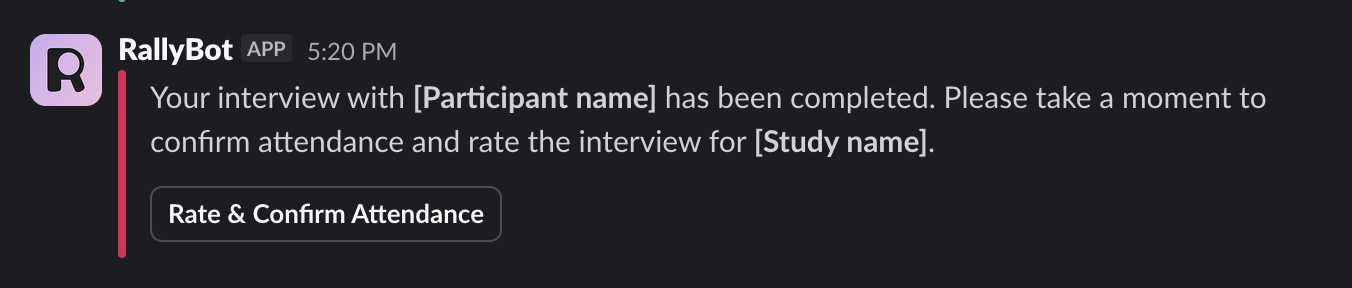
If you have Slack notifications enabled, RallyBot will send you a notification after an interview is completed with a direct link to rate the participant in Rally.
Who receives the notification to rate a participant?
The notification is sent only to the main host of the interview.
Can a participant receive more than one rating per interview?
No. Each interview can only receive one rating. If you need to update a submitted rating, click Rate & Confirm Attendance again, make your edits, and click Submit.