Interview Scheduling and Rescheduling Experience
Last updated: June 23, 2026
Participant interview scheduling
Participants can book interviews using Rally's scheduling tool. When participants access the scheduler through an email or link, they'll be directed to the calendar page. Dates with availability to book are highlighted, with the timeslots that participants can choose from shown on the right of the calendar.
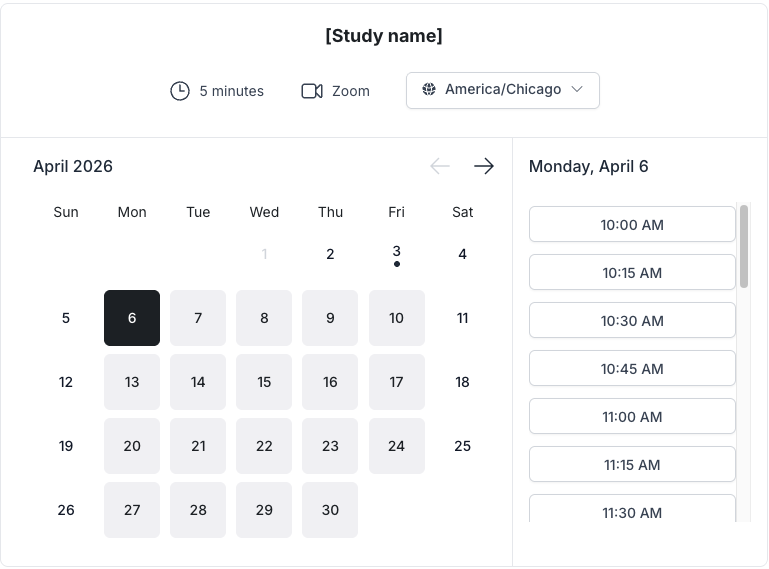
The scheduler displays the external study name, session duration/length, meeting location, and the brand logo if branding is set. The timezone defaults to the participant's current timezone, and can be adjusted as desired.
To book an interview:
Participants will select and confirm their preferred timeslot. Depending on the study setup, participants might need to sign a consent form to confirm their booking.
Participants will see an overview of the interview details and can choose a different timeslot or confirm the scheduled one.
Confirmation and automated reminder emails will be sent to participants with interview details, providing the option to reschedule or cancel the interview.
Booking additional sessions (multi-session studies)
For studies with multi-session enabled, participants can book more than one session. When returning to book an additional session, they'll receive a new email link that takes them directly to the calendar. Signup and screener are skipped since they're already in the study. Each additional session follows the same calendar selection flow as the first.
Participant rescheduling or canceling
Participants can reschedule or cancel a booked interview from either the confirmation or reminder emails sent to them and selecting the Reschedule or Cancel links:
Selecting Reschedule will direct them to the calendar page to select and confirm their new preferred timeslot based on available options. An interview confirmation email will be sent to the participant after rescheduling.
Selecting Cancel will direct them to the calendar's cancellation page and give them the option to either reschedule the interview or fully cancel the interview. A canceled event email will be sent to the participant after canceling. They can still reschedule an interview from any of the links in the confirmation emails if the study has availability.
For multi-session studies, rescheduling or canceling applies only to the specific session linked in the email. Other booked sessions for the same participant are not affected.