URL Parameters
Last updated: August 13, 2026
Add URL parameters directly to your screener or survey link within your study or form. When a participant submits the screener or survey, each parameter's value is saved to the person property you select.
This lets you pass external data, like user IDs or campaign source, through your public share link and into Rally automatically, without CSV exports or manual reconciliation.
What it does
Add query parameters to any Rally-hosted screener or survey link, for example:
https://…/s/abc123?customer_id=12345
You can also pass multiple parameters in a single link, each mapped to a different property type:
https://…/s/abc123?customer_id=CK10234&visit_count=17&budget=2500.50&subscribed=true&signup_date=2026-01-12&tier=Pro&interest=gaming
When a participant submits the screener or survey, each configured parameter's value is saved to the person property you selected.
This is only available for Rally-native screeners and surveys. Typeform and Qualtrics screeners use the separate Hidden fields feature, which sends data the other direction (Rally to your survey tool).
How it works
URL parameters and their associated values transfer via the link through the entire participant flow, including anonymous signup.
A participant who lands on the welcome page, signs up, and then completes the screener still delivers the parameters with their submission. Values are applied when the submission is processed.
To confirm values landed correctly, open the participant's profile after they submit, or add the mapped properties as columns in your People view.
If a survey or screener is submitted multiple times by the same participant, the most recent value always overwrites existing ones.
If a screener question is mapped to the same property as a URL parameter, the participant's answer takes priority over the parameter.
Setting up URL Parameters on your screener or survey
Open the study builder or signup form builder and go to Screener (for surveys, the Survey step).
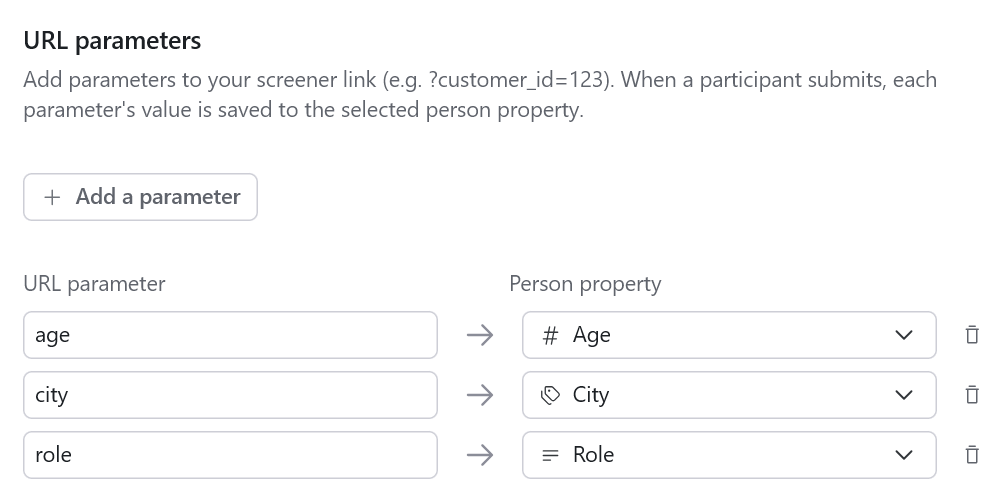
Find the URL parameters card at the bottom of the page.
Click Add a parameter. Each row maps a URL parameter to a person property.
Enter a parameter name to be used in the URL itself.
Names can include letters, numbers, underscores, hyphens, and periods (
Customer_ID,utm-source,plan.tier) and are case-sensitive.
Select a Rally property to map it to.
Only person properties are available, these are the same set used for screener question mapping.
Save the changes and ensure the study or form is published.
Once things are setup on the Rally side, simply append your parameters to the Public Share Link.
Note: Short links (
/s/<code>) carry parameters through automatically.
Supported property types for URL parameters
Rally validates each URL parameter against its target property type before applying it. If a value doesn't match the expected type, that single parameter is simply skipped and won't cause the submission to fail. The rest of the parameters are still applied normally, and the participant's submission always goes through.
Parameters that don't map to a recognized property aren't discarded, either. They're stored on the submission record so they remain available for troubleshooting, even though they won't be applied to a participant profile.
For single and multi select properties, values must match an existing option name. Options are never created automatically from URL parameter values.
Note: If a parameter is repeated in the URL (for example, ?tag=a&tag=b), how it's handled depends on the participant's path.
If they land directly on the screener, all repeated values are preserved.
If they pass through a welcome or signup step first, only the first value currently carries through, later values in that same parameter are dropped during navigation.
This only affects repeated parameters; single-valued parameters aren't impacted either way.
Property type | How values are parsed |
|---|---|
Text | Saved as-is (trimmed) |
Number / currency | Must parse as a number |
Yes/no | Accepts the following: |
Date | ISO format ( |
Single select | Must match an existing option name (case-insensitive) |
Multi select | Repeat the parameter ( Each value must match an existing multi-select option for the property. |
Frequently asked questions
Can I use this to pre-fill the participant's email?
No. Identifier fields like email, phone, and name can't be targeted, by design.
What if a parameter value doesn't match a select option?
The URL parameter will be skipped and the rest of the submission processes normally.
How do I check that a parameter's value was actually saved?
Open the participant's profile, or add the mapped property as a column in your People view. Values appear as soon as the submission is processed.
Is there a limit to how many parameters I can use?
Yes. Each link supports up to 50 parameters, and each value is limited to 1024 characters.
What does it mean when I am warned of a reserved parameter name?
Parameters Rally itself uses can't be captured, including: personId, participantId, participant_id, isPreview, debug, hidePreviewBanner, channel, ref, lang, iid, interviewBookingId, groupInterviewSlotId, bookingSource, start_time, end_time, skipWelcomePage, fromCustomScreener, rescheduleRequest, respondent_profile_id, respondent_project_id, and respondent_user_id.