Automatic Data Syncs on CSV Imports
Last updated: July 31, 2026
Rally automatically syncs data from a connected database (Snowflake, Salesforce, or BigQuery) every 24 hours. You can also enable automatic data syncs to trigger any time a CSV file is imported to ensure you get the latest, most complete participant records right away.
This allows you to stay compliant while getting the data you need.
For example:
Some Rally users may need to have limited permissions that don't allow them to see participant email addresses in Rally, which can be a blocker when finding people to contact for research.
With automatic data syncs on CSV imports enabled, those users can export a list of participant ID numbers from your company database or data warehouse, upload it into Rally, and have Rally immediately pull in all the right data to populate those people records while keeping sensitive info masked. No need to contact IT for access.
Enable automatic syncs on CSV import
This feature can be enabled in any workspace that has Salesforce, Snowflake, or BigQuery connected. Contact Rally for access.
Managing this requires the "Modify data integration settings" permission, which is included by default in the Admin, Ops Manager, and Developer/IT roles.
Navigate to Settings > Integrations.
Next to your Salesforce, Snowflake, or BigQuery integration, select Manage.
On the Sync Configuration tab, select the checkbox next to Trigger sync whenever a CSV is uploaded to Rally.
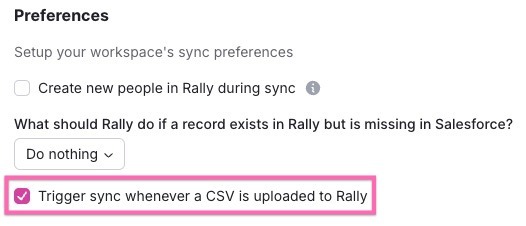
Select Save changes to apply.
With this enabled, each time you import a CSV, such as when uploading a list of participants directly into a study, a sync will trigger with the connected warehouse.